AI Script Writer for Presentations, Demos and Calls
Notch's AI script writer turns rough notes into a script you can read out, then shows it by your webcam on Mac or Windows. Paste your bullet points, pick the kind of talk, the tone and the length, and Notch drafts it. You edit the draft in the same library and open it in the teleprompter, which follows your voice as you speak.
Free 7-day trial, no card required · From $7.99 a month · Mac and Windows
Write a script with AI in Notch
Download Notch for Mac or Windows and start the free 7-day trial.
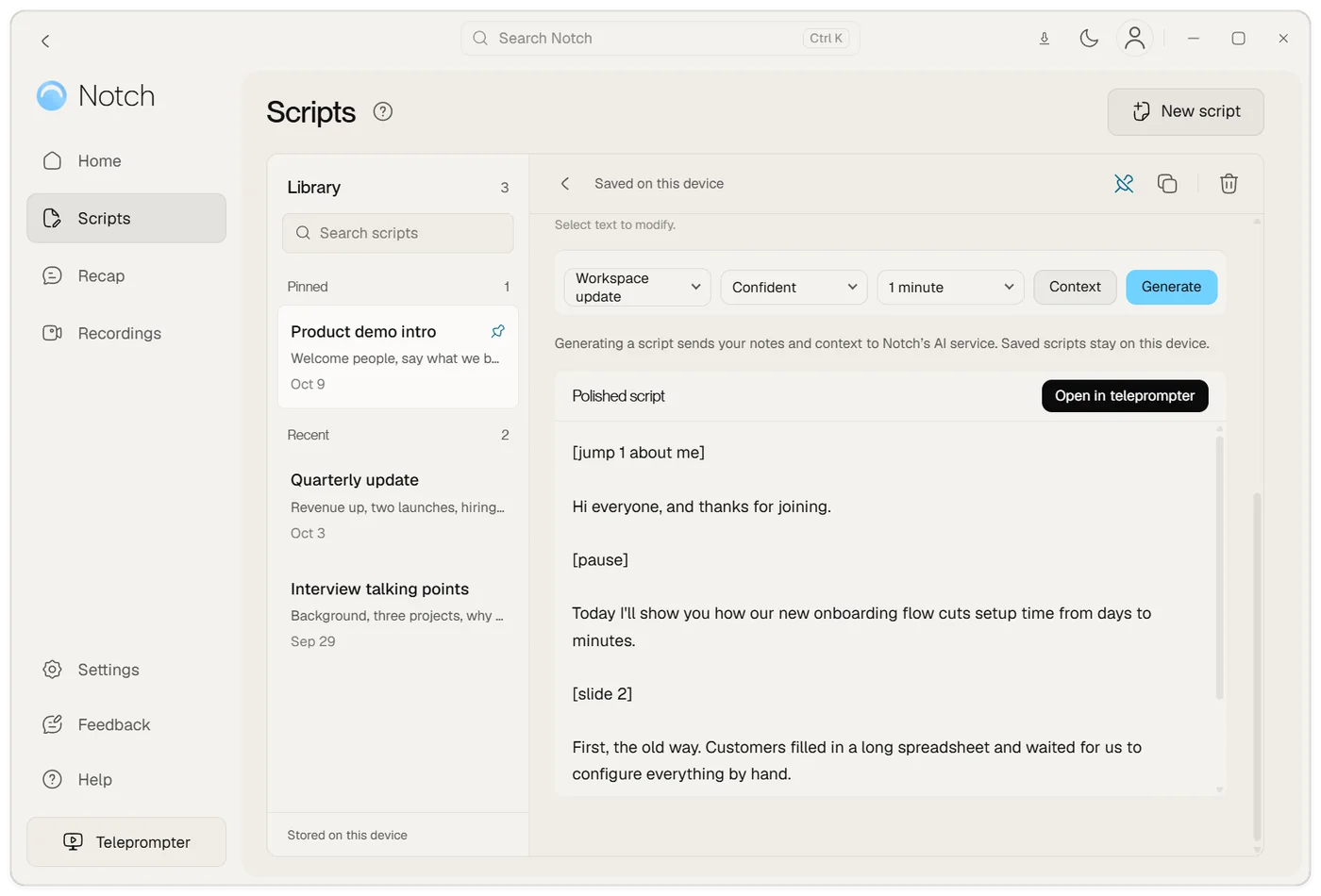
Open Scripts, choose New script and paste your rough notes, or import a .docx, .pdf or .txt file.
Pick the kind of talk, the tone and the length, then choose Generate.
Edit the draft, then choose Open in teleprompter and read it by your webcam.
From notes to a script you can say
Drafts from your notes
Paste bullet points, an email or meeting notes. The writer turns them into sentences you can read aloud.
Talk type, tone and length
Choose a workspace update, a demo or another kind of talk, a tone such as confident, and a length in minutes.
Cues that stay out of the way
Add [pause], [slide 3] or [jump 1] markers. Voice following skips anything in square brackets.
One library for every script
Pin the scripts you use often, colour the sections and search them all. Scripts are saved on your computer.
Read it with voice following
Send the script to the teleprompter. It scrolls as you speak, in seven languages, by your webcam.
Private when you present
The teleprompter is hidden from screen sharing on Zoom, Teams and Google Meet, so people see your slides.
Write for speaking, not reading
A script that works on a call is short and plain: one idea per paragraph, sentences you'd actually say, numbers rounded the way you'd say them. The writer drafts in that style, so you start from something you can read aloud instead of a page of notes.
You choose the shape before it writes:
- Kind of talk: for example a workspace update or a product demo.
- Tone: for example confident or friendly.
- Length: the number of minutes you have. The speech length calculator shows how many words fit.
Add Context if the writer should know who you're talking to or what to leave out.
Edit, mark and colour
Every script lives in one library on your computer. Pin the ones you use every week, colour sections so you can tell them apart, and search across them with Ctrl+K (Cmd+K on Mac).
Add cues in square brackets as you edit. Voice following skips anything in brackets, so [pause] or [slide 3] stays on screen as a reminder without stopping the scroll. Put [jump 1] to [jump 9] before the main parts, and Ctrl+Alt plus a number (Cmd+Option on Mac) takes you there mid-call.
Read it by the camera
Choose Open in teleprompter and the script moves to the top of your screen, just under the webcam. It scrolls when you speak and waits when you stop, in English, German, Spanish, French, Italian, Portuguese and Arabic. The teleprompter is hidden from screen sharing, so you can present slides on Zoom, Teams or Google Meet while your script stays with you.
If you're recording rather than presenting live, the same script works for a walkthrough. See teleprompter with a screen recorder.
Examples to start from
If you'd rather start from a template, the teleprompter script template has four you can copy: a product demo opener, a weekly team update, a lesson introduction and interview talking points. Paste one into Notch and ask the writer to fit it to your notes.
Plans
Start with a free 7-day trial, no card required. AI scripts are unlimited with fair use on Plus at $7.99 a month and on Pro at $13.99 a month, along with recording, editing and meeting recaps. The one-time Teleprompter, $14.99, includes the teleprompter and voice following but not AI writing. See pricing.
Frequently asked questions
What is an AI script writer?
An AI script writer turns notes or an outline into a script written to be spoken. Notch's writer drafts the script from your notes for the kind of talk, tone and length you pick, and you edit it before you read it.
Is the AI script writer free?
You can try it in Notch's free 7-day trial, which uses AI credits. After that, AI scripts are unlimited with fair use on Plus ($7.99 a month) and Pro ($13.99 a month). The one-time Teleprompter doesn't include AI writing.
What can I write with it?
Scripts you say out loud at work, such as a sales demo opener, a weekly team update, a lesson introduction, a customer onboarding walkthrough or a conference talk.
Does it send my script to the cloud?
Generating a script sends your notes and context to Notch's AI service. Saved scripts stay on your computer.
Can I import a document?
Yes. Import a .docx file, a text-based PDF or a .txt file into the script library, then generate or edit from it.
Does it work on Mac and Windows?
Yes. Notch runs on Mac (Apple Silicon and Intel) and on 64-bit Windows 10 and 11.