Teleprompter With a Screen Recorder
Notch is a teleprompter with a screen recorder built in: your script sits by the webcam and follows your voice while you record your screen and camera on Mac or Windows. When you stop, the recording opens in Notch's editor, where you trim, cut the silences, add captions and zooms, and export. Notch keeps itself out of the video, so viewers see your demo and your face, not your script.
Free 7-day trial, no card required · From $7.99 a month · Mac and Windows
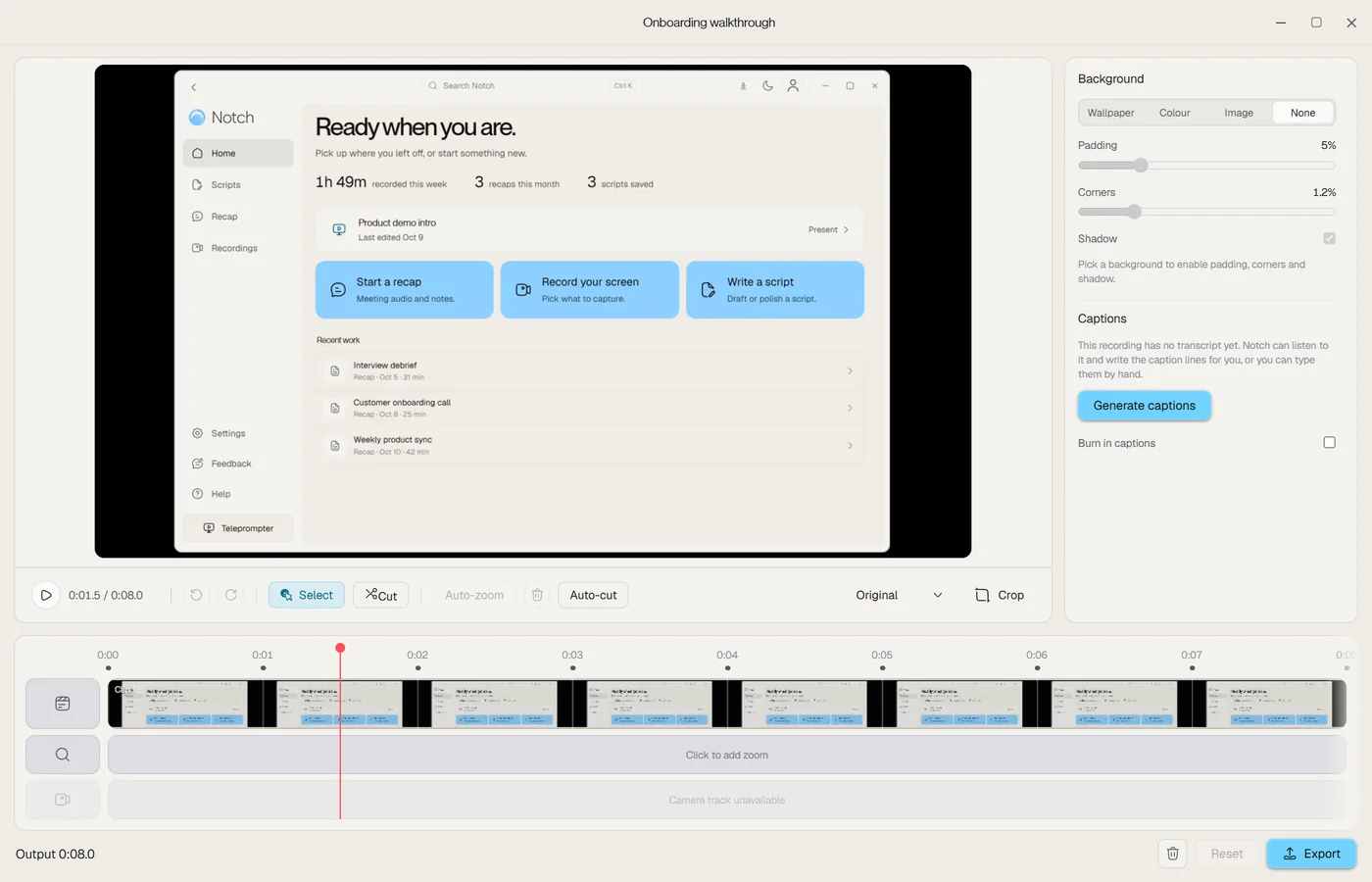
Record a walkthrough with your script in view
Download Notch for Mac or Windows and start the free 7-day trial.
Paste or write your script, then place the teleprompter under your webcam.
Choose the record button, then Screen recording. Pick a display, a window, an area or camera only, and turn on your camera and microphone.
Read your script as you record. When you stop, trim, add captions and zooms, and export.
One app for the script and the video
Script by the camera
Your lines sit right under the webcam, so your eyes stay near the lens while you talk to viewers.
Follows your voice
The script scrolls as you speak and waits when you pause to click through the demo.
Kept out of the video
Notch keeps itself out of the recording, so viewers see your screen and camera without your script.
Screen, camera or both
Record a whole display, one window, an area or just your camera, with a camera bubble you can place.
Clean audio
Background noise reduction and voice levelling run on your computer, with separate mic and system-audio levels.
Edit without another app
Trim, remove silences with auto-cut, add zooms, captions and backgrounds, then export up to 1080p at 60 fps.

“I usually have a lot of ideas and put effort into making my presentations visually strong, but delivering everything I want to say as smoothly as I imagine it can be challenging. Notch helps bridge that gap, allowing me to communicate my ideas more naturally and confidently”

Record in one take
Most walkthroughs take several tries because you look away to check your notes or lose your place. With the script right under the camera, your eyes stay near the lens, and voice following keeps the text where you are. When you stop to click through a demo, the script waits.
Put cues in square brackets, such as [open settings] or [switch to the dashboard]. They stay on screen as reminders, and voice following skips them. If you only have notes, the AI script writer drafts the script first.
Choose what to capture
| Choice | Records | Good for |
|---|---|---|
| Display | A whole screen | Walkthroughs that move between apps |
| Window | One app window | Keeping notifications out of the video |
| Area | A rectangle you draw | Focusing on one panel |
| Camera only | Your camera, no screen | Talking-head updates |
Turn on your camera to add a bubble in any corner, in a round or square shape and three sizes. Record your microphone and app sound with separate levels, and Notch reduces background noise on your computer.
Edit and export in the same app
The recording opens in the editor as soon as it's saved:
- Trim and cut the parts you don't need, or use auto-cut to remove the silences in one press.
- Add zooms with Auto-zoom from where your cursor moved and clicked, or place them by hand.
- Add captions and burn them into the video. Caption generation uses the cloud and isn't part of the free trial.
- Frame it with a wallpaper, colour or image background, padding, corners and an aspect ratio such as 16:9, 9:16 or 1:1.
- Export up to 1080p at 60 fps on Plus and Pro.
Edits never change your original recording, and a recording survives a crash, a quit or a power cut.
Who it's for
- Product and technical teams: feature walkthroughs and release demos.
- Customer success: setup guides customers can watch again.
- Educators and trainers: lessons and explainers students can revisit.
- Team leads: updates for colleagues who couldn't join the meeting.
The same app also records your live calls and writes recaps, with a transcript, summary and action items. See the AI note taker page.
Plans
Start with a free 7-day trial, no card required; the trial records up to 720p at 30 fps. Recording and editing come with Plus at $7.99 a month or Pro at $13.99 a month, which adds custom backgrounds and gradients. The one-time Teleprompter, $14.99, doesn't include recording. See pricing or compare with Loom and Screen Studio.
Frequently asked questions
Is there a teleprompter with a built-in screen recorder?
Yes. Notch records your screen and camera while your script sits under the webcam and follows your voice, then edits the video in the same app. It runs on Mac and Windows, with recording and editing on Plus and Pro.
Will my script show up in the recording?
No. Notch keeps itself out of the video while you record, so viewers see only your screen and camera. Make a short test recording before an important one.
What can I record?
A whole display, one app window, an area you draw, or your camera only. You can add your camera as a bubble in any corner, and record your microphone and app sound with separate levels. On a Mac, app sound needs macOS 14.2 or later.
What editing does it include?
Trim and cut, auto-cut to remove silences, Auto-zoom from your cursor, manual zooms, captions, backgrounds, padding, corners, crop and aspect ratios such as 16:9, 9:16 and 1:1. Custom backgrounds and gradients are on Pro.
What quality can I record and export?
Plus and Pro record and export up to 1080p at 60 fps. The free trial records up to 720p at 30 fps.
Does a recording survive if my computer crashes?
Yes. Notch keeps a recording through a crash, a quit or a power cut and finishes saving it the next time it opens.