Meeting Minutes Template (Free) for Team Meetings
Meeting minutes record who attended, what was decided and who will do what by when. Copy the free template below, or let Notch draft them from a recorded call on Mac and Windows.
Free 7-day trial, no card required · From $7.99 a month · Mac and Windows
How to use this template
Copy it before the meeting. Fill in the title, date, attendees and agenda so the page is ready when you start.
Write down outcomes, not speeches. Under each agenda item, note the decision and any action item with an owner and a date.
Tidy it the same day. Fix names, check each action item has one owner, and cut anything nobody needs later.
Send it within 24 hours. Share it with everyone invited, including people who missed the meeting.
What to include in meeting minutes
Good minutes answer one question for someone who missed the meeting: what changed, and what do I need to do? Include these parts:
- Meeting details. The title, date, time and where it happened (room or video call).
- Attendees. Who was there, who sent apologies, and who took the minutes.
- Agenda items. One short heading per topic, in the order you covered them.
- Decisions. What the group agreed, in one sentence each.
- Action items. The task, one owner and a due date.
- Open questions. Anything left unresolved, and who will follow up.
- Next meeting. The date, if one is set.
Leave out side conversations and long quotes. If people need the full discussion, link the recording or transcript.
Meeting minutes template (copy and paste)
This plain-text template works in an email, a document, Notion or a chat message. Replace each part in round brackets.
MEETING MINUTES
(Meeting title)
Date: (date)
Time: (start to end)
Location: (room or call link)
Chair: (name)
Minutes taken by: (name)

Attendees: (names)
Apologies: (who couldn't attend)

1. (Agenda item)
   Discussion: (the main points)
   Decision: (what was agreed)

2. (Agenda item)
   Discussion: (the main points)
   Decision: (what was agreed)

Action items
- (Task)
  Owner: (name) | Due: (date)
- (Task)
  Owner: (name) | Due: (date)

Open questions
- (Question)
  Follow up: (name)

Next meeting: (date and time)
For a quick stand-up, delete the discussion lines and keep only decisions and action items.
Meeting minutes example: weekly team update
Here is the template filled in for a typical weekly update. The team and names are made up for this example.
MEETING MINUTES
Weekly support team update
Date: 18 November
Time: 10:00 to 10:30
Location: Teams call
Chair: Priya
Minutes taken by: Daniel

Attendees: Priya, Daniel, Marco, Lena
Apologies: Sam

1. Ticket backlog
   Discussion: Open tickets rose
   after the billing email. Most are
   password reset questions.
   Decision: Add a password reset
   article to the help centre.

2. New onboarding call
   Discussion: Marco ran the first
   two calls. Customers asked for
   a recording to share with their
   team.
   Decision: Record each onboarding
   call and send the link afterwards.

3. Holiday cover
   Discussion: Two people are away in
   the last week of December.
   Decision: None. Lena will check
   the rota with Sam.

Action items
- Write the password reset article
  Owner: Daniel | Due: 21 November
- Record the onboarding calls
  Owner: Marco | Due: 25 November
- Confirm December cover
  Owner: Lena | Due: 22 November

Open questions
- Add screenshots to the article?
  Follow up: Daniel

Next meeting: 25 November, 10:00
Each action item has one owner and one date. That is the line people look for first.
Meeting minutes vs notes vs summary
People often use these words for the same thing. They do different jobs:
| Type | What it records | Who it's for |
|---|---|---|
| Minutes | Attendees, decisions, action items and owners, in agenda order | Everyone invited, and a record for later |
| Notes | Anything the note taker found useful, in any order | Mostly the person who wrote them |
| Summary | A short overview of what was discussed and why it matters | People who missed the meeting, or a manager |
A meeting summary template is a shorter version of the one above: three or four lines on what happened, then the action items.
How to write minutes people read
- Write in the past tense. "The team agreed to record onboarding calls."
- Give every task a named owner. A task that belongs to the whole team often slips.
- Keep opinions out. Record what the group decided and leave out who argued for which side.
- Put action items where people see them. At the end of the minutes, or at the top of the email.
- Use the same format every week. People learn where to look.
If the meeting runs on a video call, it helps to have your agenda in view while you talk. A teleprompter for Teams or Zoom keeps your points by the camera when you chair.
Get meeting minutes from a recorded call
Typing minutes while you take part is hard. Notch records the meeting on your Mac or Windows computer and writes a recap you can turn into minutes. No bot joins the call, so the participant list stays the same.
- When Notch sees a Zoom, Teams, Google Meet, Webex or Slack huddle window, it offers to start a recap. Nothing records until you choose to.
- Tell everyone you are recording.
- Choose Stop when the meeting ends.
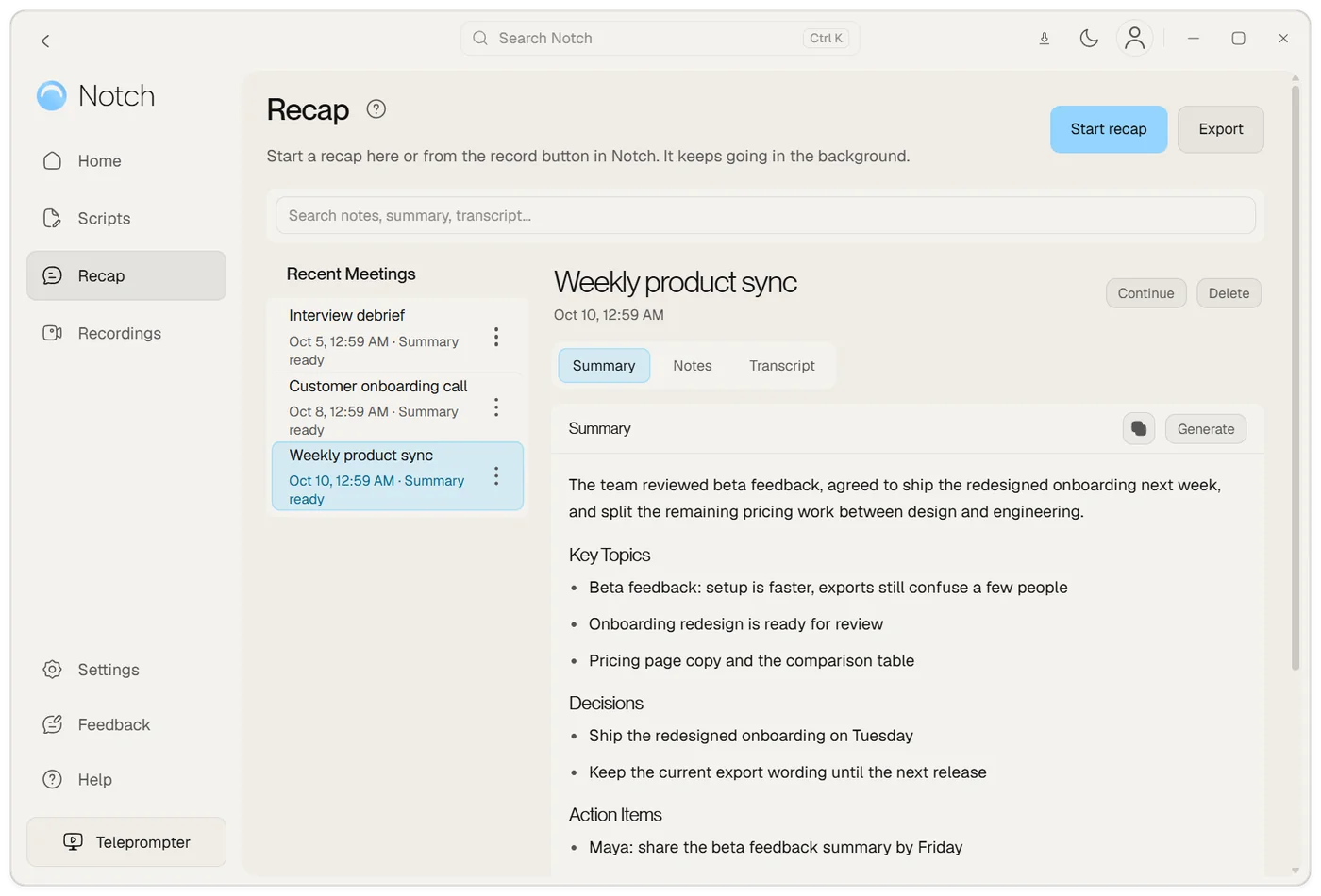
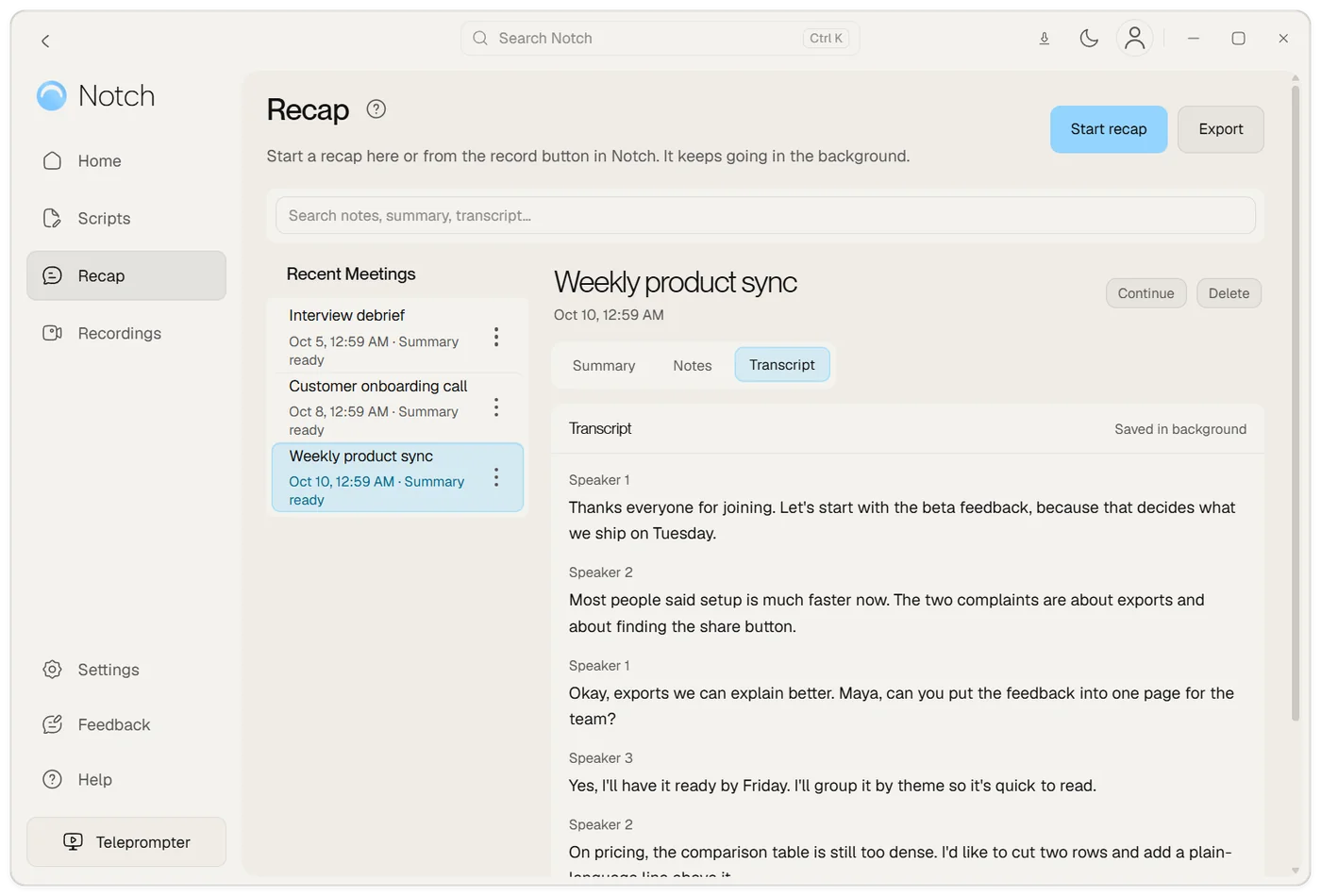
The recap has a summary, decisions and action items with who agreed to them, the key points as timestamped chapters, and a transcript that shows who said what. Name a speaker once and Notch recognises their voice in later recaps.
To share it, paste the summary into the template above, or export the summary and transcript as text or PDF. You can also save the recap to Notion or turn action items into Linear issues. Read the draft before you send it, and fix any names or owners.
Recaps use cloud transcription and come with Plus or Pro. You can try them with the free 7-day trial, no card required. For step-by-step guides, see how to record a Zoom meeting and the AI note taker page.
Tell people you are recording
Say at the start of the meeting that you are recording and why, for example "so I can write the minutes". Many companies and countries require everyone's consent. The meeting app shows its recording notice only for its own recordings, so when you record with Notch, tell people out loud.
Get all 6 templates by email
Discovery call script, sales call follow-up email, meeting minutes, product demo opener, weekly team update and lesson or training intro, in one email you can keep.
Frequently asked questions
How long should meeting minutes be?
Most team meeting minutes fit on one page. Keep a short line for each agenda item, then list the decisions and action items. If someone needs every word, share a transcript or recording alongside the minutes.
Who should take the meeting minutes?
Pick someone who isn't running the meeting, so the chair can focus on the discussion. Many teams rotate the job each week. If you record the call, the note taker can check the draft instead of typing everything live.
What is the difference between formal and informal minutes?
Formal minutes are used by boards, committees and councils. They record motions, who proposed and seconded them, votes and whether a quorum was present, and they are approved at the next meeting. Informal minutes, used by most teams, keep only the decisions, action items and key points.
How soon should you send meeting minutes?
Send them the same day or within 24 hours, while people still remember the meeting. Action items with near deadlines lose time every day the minutes sit in a draft.
Can AI write meeting minutes?
AI can draft them from a recording. Notch records the call on your Mac or Windows computer with no bot in the meeting, then writes a summary, decisions, action items and a transcript. Always read the draft and fix names and owners before you send it.
What is the difference between meeting minutes and a meeting summary?
Minutes are the formal record of who attended, what was decided and who owns each task. A summary is a short overview of what was discussed, often written for people who weren't there. Many teams send both in one message.