Sales Call Follow-Up Email: Template and Example
A sales call follow-up email goes out the same day and repeats what you agreed, the next step, who owns it and the date. Copy the template below and fill it from your call notes or recap.
Free 7-day trial, no card required · From $7.99 a month · Mac and Windows
Write the follow-up from your recap
Record the sales call with Notch on Mac or Windows. Tell everyone on the call that you are recording.
Choose Stop when the call ends and open the recap.
Copy the decisions and action items into the template below, then add the next step with a date.
Read it once, cut anything the buyer doesn't need, and send it the same day.
What the recap gives you
Decisions and action items
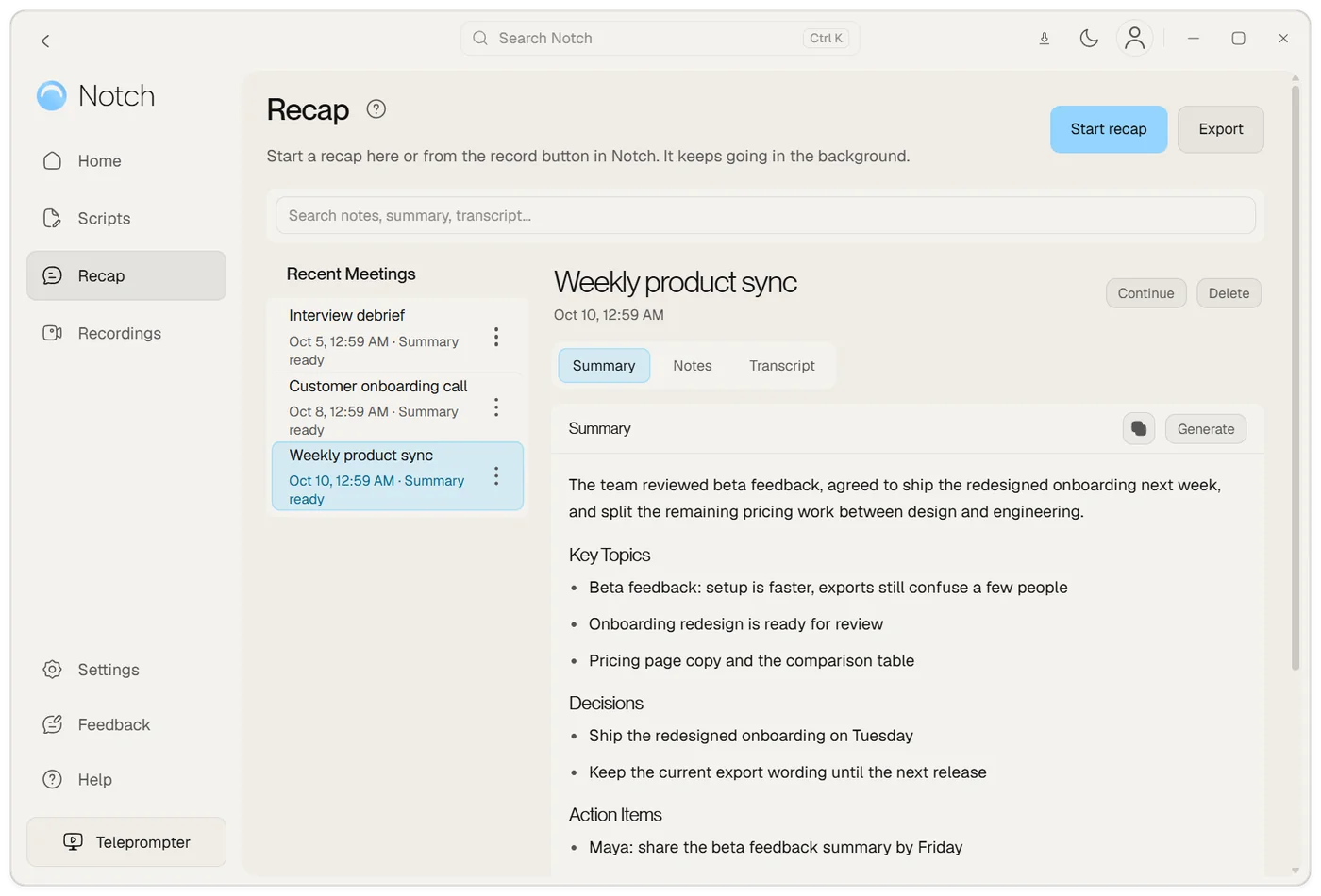
Each recap lists what was agreed and the tasks, with who agreed to them. Those lines become the core of your email.
No bot on the call
Notch records on your computer, so nobody has to admit a note taker to a call with a prospect.
Talking points for the next call
Keep the agenda for the follow-up meeting by your webcam in the Notch teleprompter.
What to include in a sales call follow-up email
A buyer reads your follow-up to check that you heard them. Most also forward it to someone who wasn't on the call. Write it so that person can follow it too.
- A thank-you line that names the call, such as "Thanks for the demo this morning".
- Their problem in their words. One sentence on what they said they need to fix.
- What you agreed. Two or three decisions from the call.
- Action items with owners. Who does what, on both sides.
- One next step with a date. A meeting, a trial, a document or a decision.
- Anything you promised. The pricing, the case study or the answer you didn't have on the call.
Leave out the full pitch. If a point didn't come up on the call, it doesn't belong in the follow-up.
Sales call follow-up email template
Copy this and replace each part in round brackets.
Subject: (Call name) recap and next steps

Hi (first name),

Thanks for your time (today / this morning).
It was helpful to hear about (their problem in their words).

What we agreed:
- (Decision one)
- (Decision two)

Next steps:
- (You): (task) by (date)
- (Them): (task) by (date)

As promised, here is (pricing / the link / the answer to their question).

Does (day, time) work for (the next meeting)?

Thanks,
(Your name)
Keep one question at the end, and make it easy to answer with a yes or a new time.
Example: follow-up after a product demo
This example is made up to show the template filled in. It follows a 30-minute demo with an operations manager and her team lead.
Subject: Today's demo recap and next steps

Hi Maria,

Thanks for your time this morning.
It was helpful to hear how long weekly reporting takes
your team, about half a day each Friday.

What we agreed:
- The reporting dashboard is the first thing to test.
- Ahmed will join the trial as the main user.

Next steps:
- Me: set up your trial account by Wednesday.
- You: send two sample reports by Thursday.
- Both: 20-minute check-in once Ahmed has tried it.

As promised, the pricing page is attached.

Does Tuesday at 10:00 work for the check-in?

Thanks,
Sam
Every line in the example came from something said on the call. The dates and owners do most of the work, because they turn a polite email into a plan.
Subject lines for a sales follow-up
Pick a plain subject line that tells the buyer what is inside:
- Recap of today's call and next steps
- (Company) demo: what we agreed
- Pricing for (company), as promised
- Next steps after our call on (day)
- Your questions from today, answered
Avoid subject lines that only say "Following up" or "Checking in". They are hard to find later and give no reason to open the email.
When to send it
Send the follow-up the same day as the call. The details are fresh for you, and the buyer can still remember what each point means.
If you need time to get an answer, don't hold the whole email. Send the recap and next steps now, and say when the missing answer will arrive. When the buyer goes quiet, reply in the same thread a few working days later with one useful addition and the next step again.
Fill it from your call recap
The hardest part of a follow-up is remembering exactly what was agreed. Notch is an app for Mac and Windows that records the call on your computer and writes a recap. No bot joins the call, so the prospect sees the same participant list as before. Tell everyone at the start that you are recording.
When Notch sees a Zoom, Microsoft Teams, Google Meet or Webex window, it offers to start a recap. Nothing records until you choose to. When you choose Stop, the recap maps straight onto the template:
| Recap part | Where it goes in the email |
|---|---|
| Summary | Their problem and the thank-you line |
| Decisions | What we agreed |
| Action items | Next steps, with owners |
| Chapters | Finding the exact moment a question came up |
| Transcript | Checking their words before you quote them |
You can export the summary and transcript as text or PDF, save the recap to Notion, or turn action items into Linear issues. Notch writes the recap; you still write and send the email yourself. Recaps use cloud transcription and your plan's allowance. Start with the free 7-day trial, no card needed, then recaps come with Plus from $7.99 a month. The AI note taker page explains how recaps work, and the guides to recording a Zoom meeting and recording a Teams meeting cover each app.
Mistakes to avoid
- Ending with an open question. "Let me know your thoughts" gives them nothing to say yes to. Ask for a specific time or task.
- Sending one email to every contact. A finance lead and a daily user care about different points. Write a short version for each if they need it.
- Guessing at what was agreed. If you're not sure who owns a task, check the recap or ask in the email.
Get all 6 templates by email
Discovery call script, sales call follow-up email, meeting minutes, product demo opener, weekly team update and lesson or training intro, in one email you can keep.
Frequently asked questions
How soon should I send a follow-up email after a sales call?
Send it the same day, ideally within a few hours, while the call is fresh for both of you. If you promised something you can't send yet, send the recap now and say when the rest will arrive.
How long should a sales follow-up email be?
Short enough to read on a phone. A thank-you line, two or three points from the call, the action items and one next step usually fit in under 150 words. Put long material in an attachment or a link.
What subject line should I use?
Name the call and the next step, such as "Recap of today's demo and next steps" or "Pricing for (company), as promised". Plain subject lines are easy to find again when the buyer forwards the email.
Who should I copy on the follow-up?
Everyone who was on the call, plus anyone who owns an action item. If the buyer said they would share it with a manager, offer a short version they can forward.
Can Notch write the follow-up email for me?
Notch writes the recap, not the email. It gives you the summary, decisions and action items from the call, and you copy them into your own email and send it. You can also export the summary and transcript as text or PDF.
What if the prospect doesn't reply?
Wait a few working days, then reply in the same thread with one useful addition, such as the answer to a question from the call, and repeat the next step. Keep it to two or three lines.